How To Tunnel All Your VPS Traffic Through WireGuard without Losing SSH
Intro
When we enable a WireGuard tunnel at system-level, i.e. not using implementations such as wireguard-go, each outgoing packet of our system could use either our VPS's physical interface or the WireGuard's. The packets going through the first, would carry our own IP as their source IP, the latter the VPN's IP address.
Clearly, we want to maximize anonymity by making every outgoing packet show a different IP than ours. But if every outgoing packet were set to use the VPN's IP, then we wouldn't be able to accept any incoming connections to our server. A client that starts a connection with our VPS, expects a response from the same address it requested the connection from.
So, for our VPS to be able to respond to incoming connections and act as a server, it needs to reply to incoming connections aimed at its physical interface as itself. By default, turning on a WireGuard connection that has AllowedIPs = 0.0.0.0/0, ::/0, changes the routes in Linux in such a way that all packets go out using WireGuard, this is what we've asked of it after all. Unfortunately, it also means our server is incapable of accepting any incoming connections on its own IP.
If you have ever tried tunneling all your VPS traffic through WireGuard, you may have learned what I just said the hard way. Because as soon as you enable a WireGuard VPN, you will lose all ingress connections to your VPS, including SSH. You also won't have the ability to use your VPS, unless you have out-of-band VNC access or force a reboot. So what's the solution?
There are multiple solutions, including one that I had written about earlier, but in this post, we will solve this issue using a stateful marking approach. We will:
- Mark the connections initiated from the physical interface: Use nftables to mark all the incoming connections aimed at our physical interface.
- Mark the connection's packets: Use nftables to mark the individual packets of the previously marked connections, prior to an outgoing routing decision.
- Route the packets: Execute iproute2 commands to use Linux's policy-based routing, sending the packets from incoming connections to where they were initiated using our real IP.
Step One: Marking Incoming Connections as Soon as They Hit Our Physical Interface
This happens in the input prerouting chain of our ruleset, we use the prerouting chain and not the input chain because we need to mark these connections as they hit our physical interface. If we had used the input chain, we would not have the ability to keep track of incoming connections to containers. The input chain is triggered only before a packet is delivered to an app inside our host, and container networks have their own dedicated bridges, so their packets traverse the forward chain, not the input chain:
chain prerouting {
    type filter hook prerouting priority mangle; policy accept;

    # mark **connections** incoming on our host to keep track of them
    iifname "enp0s6" ct mark set 0x34

}
Step Two: Mark the Connection's Packets Before the Outgoing Routing Decision Takes Place
As I mentioned, when enabling WireGuard, every packet goes out of the Wireguard interface. We must manually manage our egress traffic, and steer our outgoing packets to the right interface. To do this, we mark the individual packets of a connection before the outgoing routing decision takes place. The ones we mark will go out of our VPS's gateway, instead of the VPN's.
We already marked the connections in the previous step, so we know which connections should bypass WireGuard. The ct mark marks connections, and at this step we need to mark the packets of these connections before they go out.
Interestingly, this marking should happen at two different chains. The fact that I learned in this journey is that the meaning of input and output are not what you would expect. input is specifically the packets that go into a process, not the input of our physical IP address, and output are the packets that come out of a process not the outgoing packets of the server. A container is not a process, so while we use output for our local processes, a different chain is needed for handling container traffic. Try to guess which one before reading on.
Packets that go out of our physical interface
Once the incoming traffic is consumed by the processes, they produce some packets in response. We know which of the requests should be responded using our real IP address, because we have already marked their connections.
We write our rules in the output chain, but to force a re-routing decision, the type of the chain should be route and not filter.
    chain output {
        type route hook output priority mangle; policy accept;

        # Restore meta mark for locally generated host traffic
        ct mark 0x34 meta mark set 0x34
    }
Packets that come out of containers
For packets that go out of docker containers, which chain do you think we will use? prerouting, input, forward, or output?
While it may seem counterintuitive, we catch these packets at the prerouting chain! Docker and other container technologies use Linux bridges. Both our host system and the containers have their own dedicated IPs on their shared bridge. As our host acts as the containers' gateway to the Internet, each outgoing packet from a container is an incoming packet for our host on that bridge.
The nftables on our host sees outgoing packets from these containers as incoming packets on its bridge. So just like how our enp0s6 (or eth0) is an interface, so is our docker bridge, and other bridges. The exact chain that we used previously to mark connections, will be used to catch packets going out of the containers (coming in our host):
chain prerouting {
   type filter hook prerouting priority mangle; policy accept;

   # mark **connections** incoming on our host to keep track of them
   iifname "enp0s6" ct mark set 0x34

   # mark **packets** going out of containers, before the routing decision
   iifname "docker*" ct mark 0x34 meta mark set 0x34
   iifname "br-*" ct mark 0x34 meta mark set 0x34
   iifname "tun0" ct mark 0x34 meta mark set 0x34
   iifname "incus*" ct mark 0x34 meta mark set 0x34
   iifname "veth*" ct mark 0x34 meta mark set 0x34
}
Final result
This nftables table is what we have at the end:
table inet keep_conn {
    chain prerouting {
      type filter hook prerouting priority mangle; policy accept;

       # mark **connections** incoming on our host to keep track of them
       iifname "enp0s6" ct mark set 0x34

       # mark **packets** going out of containers, before the routing decision
	iifname "docker*" ct mark 0x34 meta mark set 0x34
	iifname "br-*" ct mark 0x34 meta mark set 0x34
	iifname "tun0" ct mark 0x34 meta mark set 0x34
	iifname "incus*" ct mark 0x34 meta mark set 0x34
	iifname "veth*" ct mark 0x34 meta mark set 0x34
    }

    chain output {
        type route hook output priority mangle; policy accept;

        # Restore meta mark for locally generated host traffic
        ct mark 0x34 meta mark set 0x34
    }
}
Step Three: Policy-based Routing
Now that each incoming connection, and outgoing packet is marked excellently, all we have to do is steer them toward the VPS's gateway instead of the VPN's.
First, we create a table named keep_connections that routes all the traffic through our VPS's gateway, then we will send all the marked packets towards it.
The first script, at /usr/local/bin/wg-post-up.sh, creates the routing table and forces the marked packets to use it.
#!/bin/bash
set -xeu

PATH=/usr/local/sbin:/usr/local/bin:/usr/sbin:/usr/bin:/sbin:/bin
RTTABLE="52 keep_connections"
grep -qxF "$RTTABLE" /etc/iproute2/rt_tables || echo "$RTTABLE" >> /etc/iproute2/rt_tables

GW4=$(ip route show default dev enp0s6 | awk '{print $3}')
if [ -z "$GW4" ]; then
    echo "wg-post-up: no default gateway found on enp0s6, aborting" >&2
    exit 1
fi

ip route replace default via "$GW4" dev enp0s6 table keep_connections

# Priority 40: must beat wg-quick's own rule so marked
# traffic bypasses the tunnel instead of racing it.
ip rule add fwmark 52 table keep_connections priority 40 2>/dev/null || true

# You can whitelist any destination IP you like to see your original IP whether the traffic is generated from processes in your host or containers, here 9.9.9.9 is white-listed as an example:
ip route replace table 51820 9.9.9.9 via 10.0.0.1 dev enp0s6 || true
The second script, at /usr/local/bin/wg-pre-down.sh removes the white-listed IP rule from WireGuard's table:
#!/bin/bash
ip route del table 51820 9.9.9.9 || true
The last script, at /usr/local/bin/wg-post-down.sh, removes the rule and table we have created, making our system treat the marked packets as normal ones.
#!/bin/bash
set -xeu

PATH=/usr/local/sbin:/usr/local/bin:/usr/sbin:/usr/bin:/sbin:/bin
ip rule del fwmark 52 table keep_connections 2>/dev/null || true
ip route flush table keep_connections 2>/dev/null || true
Using these scripts and making them executable by running chmod +x =/usr/local/bin/wg*, we change our WireGuard config to run them:
[Interface]
#...
Table = 51820
PostUp = /usr/local/bin/wg-post-up.sh
PreDown = /usr/local/bin/wg-pre-down.sh
PostDown = /usr/local/bin/wg-post-down.sh
and at last, we're ready to start the WireGuard on our server safely by running sudo systemctl start wg-quick@wg0
AI-generated stuff
I didn't use AI to write this blog post, but here are some niceties to have from AI:
Flowchart of Our Packets
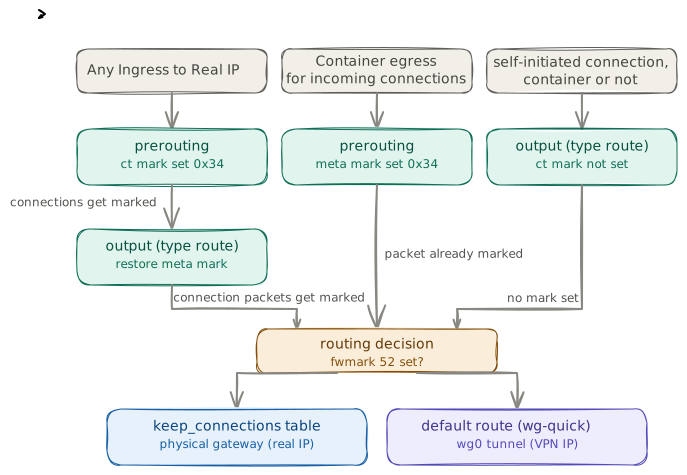
AI-generated nftables Primer
nftables organizes rules into tables, which hold chains, which hold rules. A chain only runs if it's attached to a hook — a point in the kernel's packet-processing path. The five hooks, in the order a packet can pass through them:
prerouting— before any routing decision, sees every packet arriving on any interface (including bridges for containers)input— packets destined for a local process on this hostforward— packets being routed through this host to somewhere else (this is what containers behind a bridge normally use)output— packets generated by a local process on this hostpostrouting— right before a packet leaves an interface
Each chain also has a priority (we used mangle, which runs early — before NAT and filtering) and a type: filter for normal accept/drop decisions, route for chains that need to trigger a fresh routing lookup after you touch the packet, only output chain can have type route.
Two mark types matter here, and mixing them up is the most common source of bugs:
ct mark— attached to the connection (persists for its lifetime, shared by every packet in that flow)meta mark(often just called the packet mark, or fwmark) — attached to an individual packet, and it's the only oneip rulecan actually match on
The pattern in this post is exactly that split: mark the connection once when it arrives (ct mark), then on every subsequent packet copy that connection mark onto the packet mark (meta mark) right before a routing decision happens, so ip rule fwmark ... can catch it.
Have thoughts or questions? I'd love to hear them:
Delta Chat
hossein@naghdbishi.com (pgp)
Want more content now? This blog's archive has 52 ready-to-read articles. I also curate a list of cool URLs I find on the internet.
Found a mistake? This blog is open source, you can always open an issue.
Thanks for reading! ♡ All content on this blog is licensed under